
There are a few reasons why your active listing is not appearing or is ranked lower in the Google search results page:
- The Property Value page or the Sold listing of the property has been on the internet longer than your new active listing.
- You have just pushed your listing to our website and Google has not crawled your new or updated listing yet, making it not appear in the search results.
- You have elected not to show the address of your listing on realestate.com.au.
Note: The frequency that Google crawls new or updated listings varies. Please be patient, the Google bots will eventually crawl and update your listing to add it to the search results.
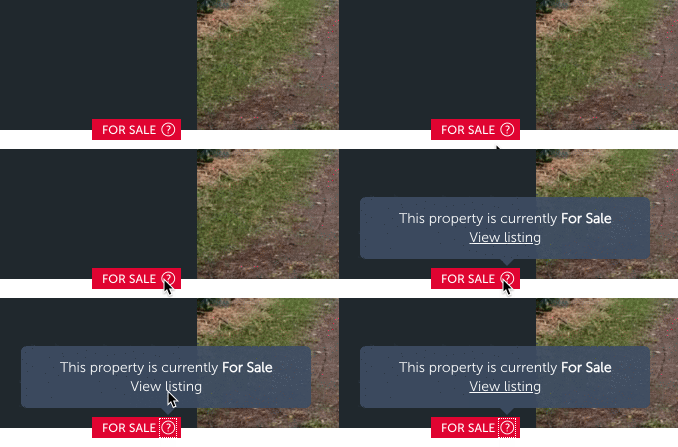
To ensure that potential buyers can find your listing in Google search results, realestate.com.au adds a FOR SALE link in the Property Value page of the property so that potential buyers who stumble upon the Property Value page first can access your listing.
How to access your listing in the Property Value page
- In the Property Value page for the address, you will find a FOR SALE label located on the left side of the property images.
- Click the ? next to FOR SALE.
- Click View listing in the pop-up.
Note: Please allow up to 24 hours for the FOR SALE link to appear in the Property Value page.
Google’s search algorithm is constantly being updated, so although your listing may not appear or is appearing below the Property Value page today, the results may change by tomorrow.
Note: Our Customer Care team is unable to update your listing to appear higher in Google search results.
Comments
0 comments
Please sign in to leave a comment.